Kubernetes Observability
Done Right
Open-source enterprise dashboard for Kubernetes teams. Complete visibility across every resource, real-time metrics, log streaming, GitOps integration — all read-only, all GitOps-first.
Built for Engineering Teams
Every feature a platform engineer, SRE, or developer needs to operate Kubernetes clusters confidently — with zero risk of accidental mutations.
Auto-Discovery — 60+ Resources
Klarity calls GET /apis on startup and maps every resource type including all installed CRDs. Istio, Cert-Manager, Prometheus Operator — everything appears automatically.
Read-Only by Design
No create, edit, or delete for cluster resources. In a GitOps workflow your cluster's source of truth lives in Git — not a web form. Klarity never bypasses your review pipeline.
GitOps-FirstGitOps Integration
Auto-detects ArgoCD and Flux CD by scanning installed CRDs. Apps, sync status, health, source, revision, Kustomizations, HelmReleases — all appear automatically with zero configuration.
ArgoCD + FluxReal-time Metrics
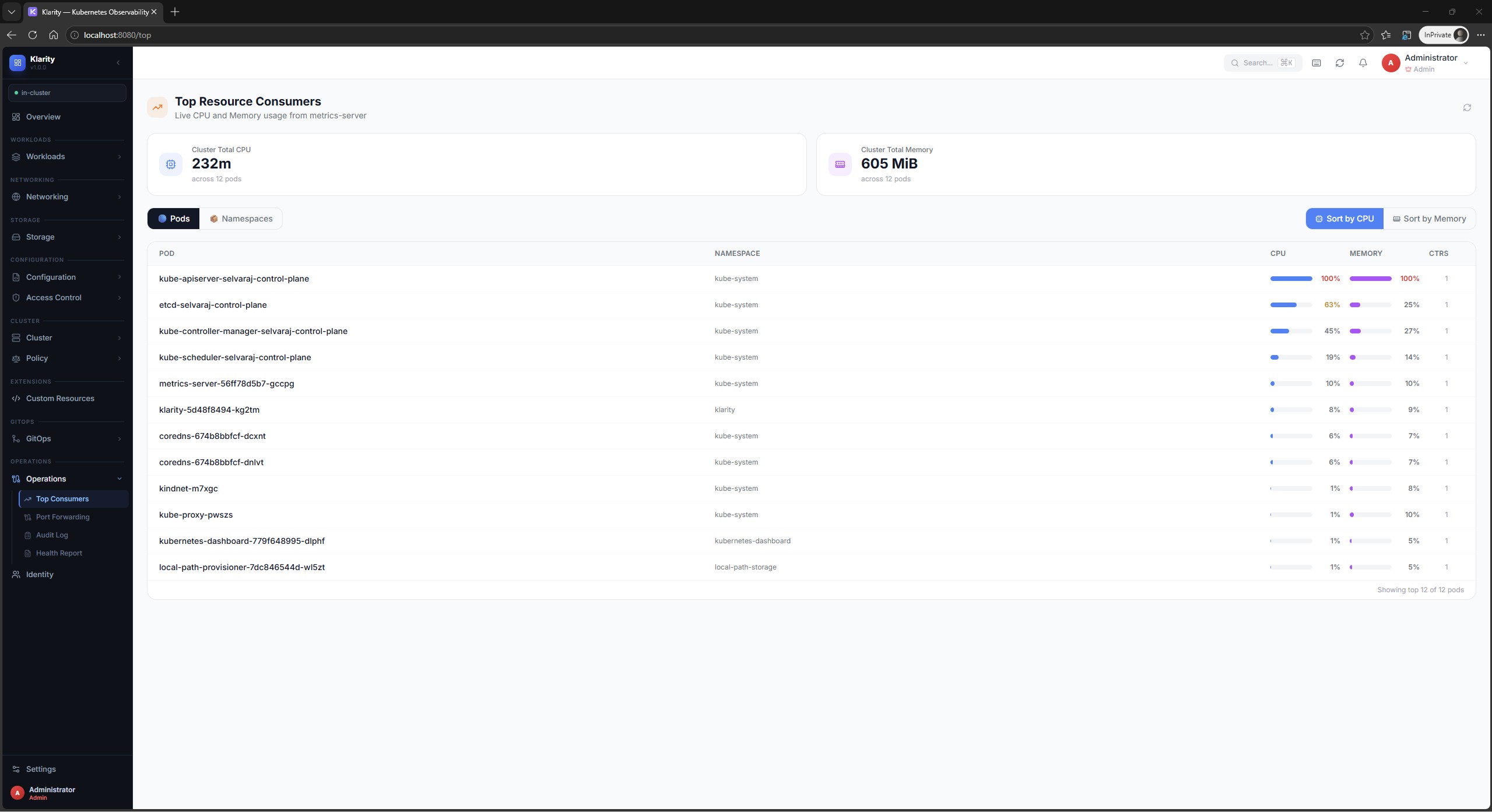
Live CPU and Memory for every node and pod via metrics-server. Top Consumers view, container-level breakdowns, circular capacity gauges, and namespace summaries.
metrics-serverWeb Terminal
Full kubectl exec in your browser via xterm.js. Connecting, connected, reconnecting, and error states handled gracefully. No local kubectl required.
xterm.jsLive Log Streaming
Real-time WebSocket log streams with severity filtering (ERROR / WARN / INFO / DEBUG), keyword search, auto-scroll toggle, and one-click download.
WebSocketPort Forwarding
SPDY tunnel through the Kubernetes API exposed as a local HTTP proxy. Access any pod's service port directly in your browser — no kubectl, no local tools.
SPDY ProxyActivities Panel
Persistent right-side drawer. Pin log streams and terminals so they keep running while you navigate. Multiple sessions in a tab bar — all stay alive.
Persistent SessionsEnterprise Auth
Built-in user management with bcrypt passwords, roles, account lockout, and JWT tokens. OIDC/SSO for Google, GitHub, Okta, Azure AD, Dex, Keycloak, Auth0.
OIDC + InternalSee Klarity in Action
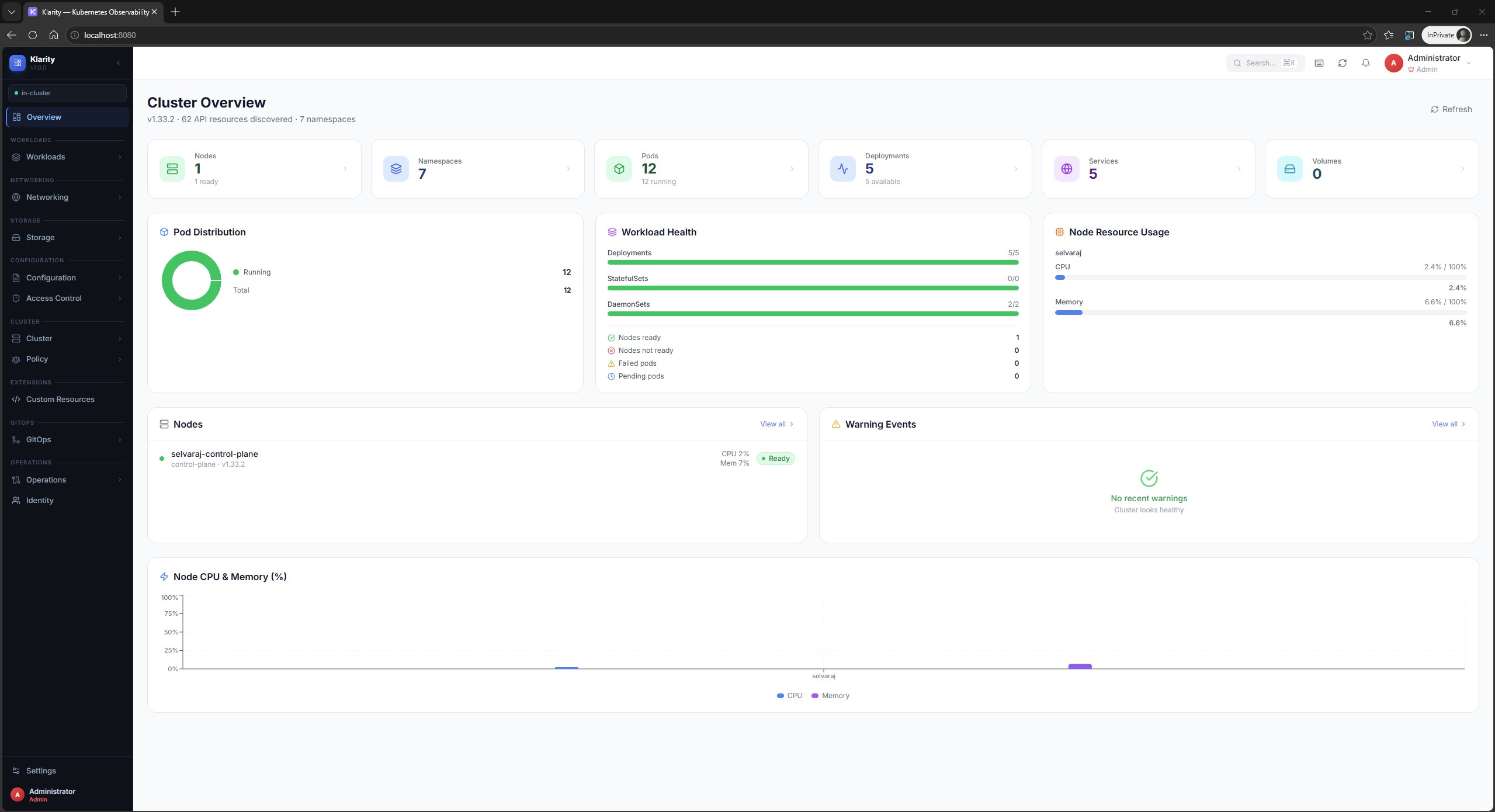
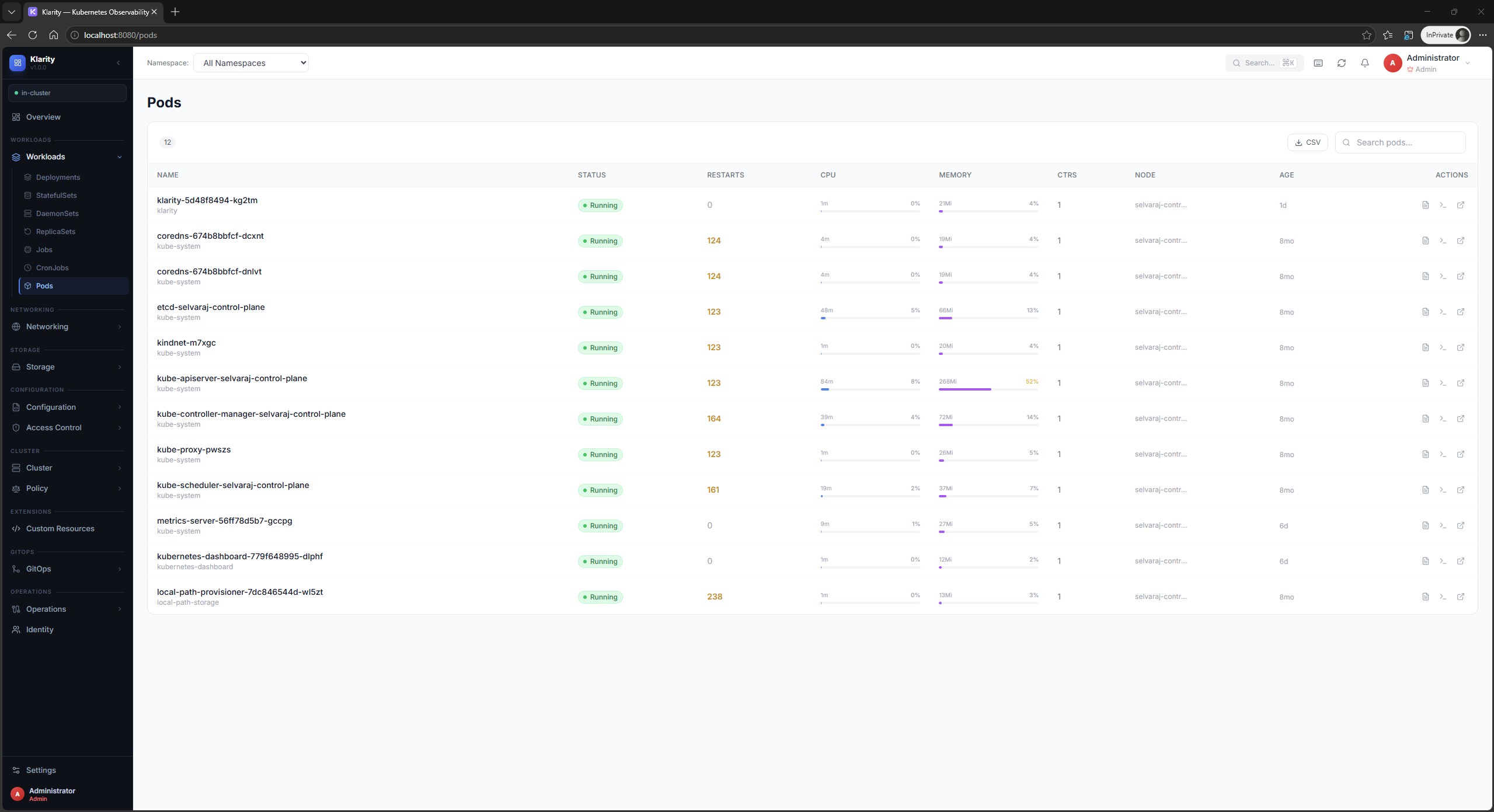
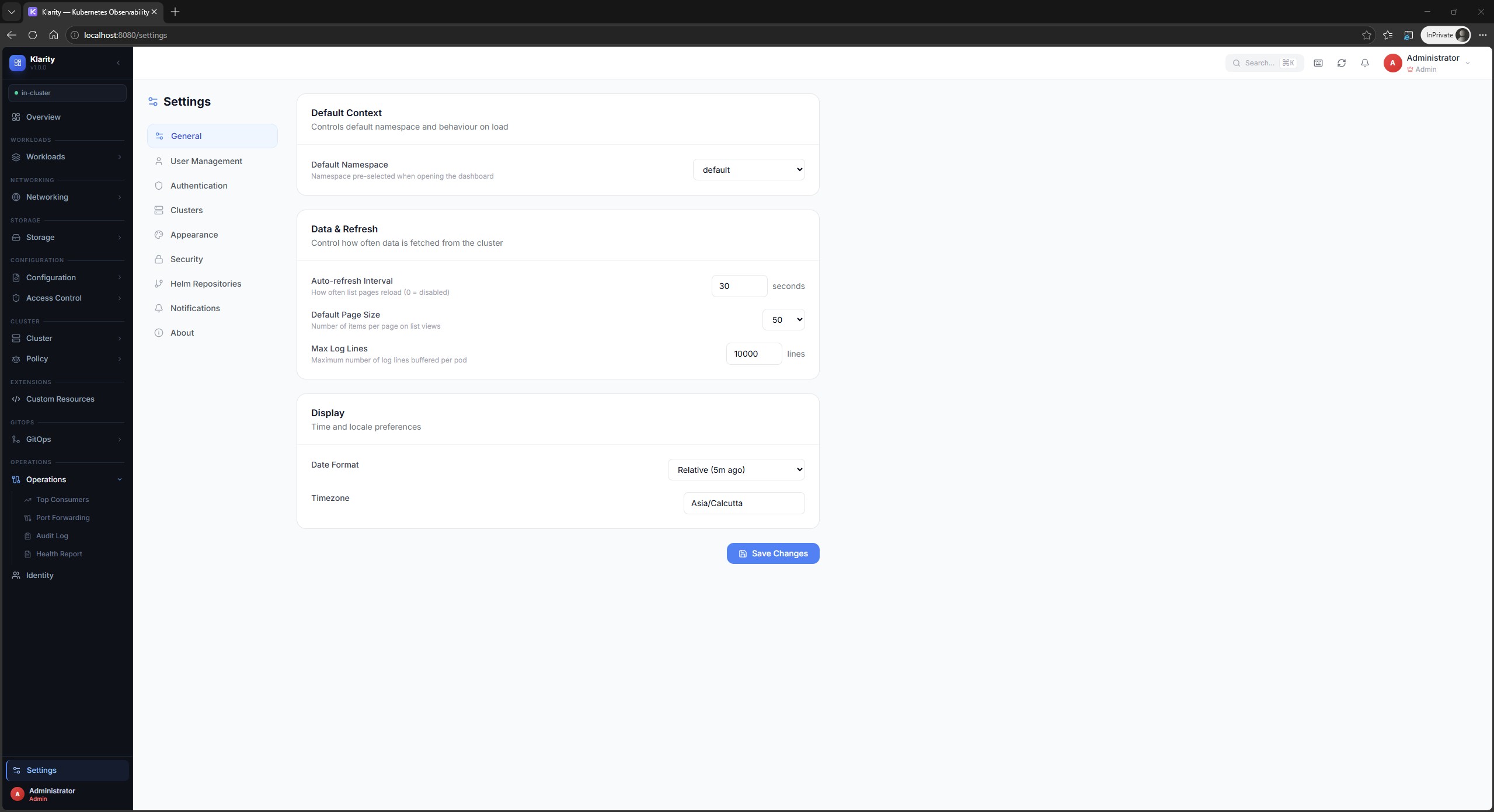
Real screenshots from a live Kubernetes cluster. Click any image to enlarge.
Up and Running in Minutes
Three installation paths. All free. All self-hosted. Zero vendor lock-in.
# Add the Helm repository
helm repo add klarity https://selvarajmurugesan90.github.io/klarity
helm repo update

# Install into the klarity namespace
helm upgrade --install klarity klarity/klarity \
  --namespace klarity \
  --create-namespace \
  --set config.authMode=internal

# Open the dashboard
kubectl port-forward svc/klarity 8080:8080 -n klarity
Default credentials: admin / admin@123 and viewer / viewer@123 — password change required on first login.
# Apply manifests
kubectl apply -k https://github.com/selvarajmurugesan90/klarity/deploy/manifests

# Check status
kubectl get all -n klarity

# Open the dashboard
kubectl port-forward svc/klarity 8080:8080 -n klarity
# Uses ~/.kube/config · Auth mode: none · No account required
git clone https://github.com/selvarajmurugesan90/klarity
cd klarity
docker compose up

# Open http://localhost:8080
Works with Your Identity Provider
Built-in user management or plug in any OIDC-compatible SSO provider.
Simple, Stateless, Secure
A single Go binary embeds the React frontend, connects to Kubernetes in-cluster, and exposes a clean REST + WebSocket API. Nothing to manage.
- React 18 + TypeScript
- TanStack Query v5
- Zustand state
- xterm.js terminal
- Monaco YAML viewer
- Recharts metrics
- REST JSON /api/v1/*
- WebSocket /ws/logs
- WebSocket /ws/exec
- HTTP proxy /proxy/*
- Auth middleware
- Audit ring buffer (2000)
- CORS + Gzip
- ~150 route handlers
- WebSocket managers
- SPDY port-forward proxy
- JWT 8h access tokens
- JWT 7d refresh tokens
- bcrypt cost-12 passwords
- OIDC / OAuth2
- In-cluster ServiceAccount
- GET /apis auto-discovery
- client-go + dynamic
- metrics.k8s.io
- 60+ resource types
- All installed CRDs
- ArgoCD Applications
- Flux CD resources
- metrics-server
Why Klarity?
Designed specifically for GitOps teams who want observability without accidental mutations.
| Feature | Klarity | Headlamp | k9s |
|---|---|---|---|
| Read-Only / GitOps-First | ✓ | ✗ | ✗ |
| Built-in User Management | ✓ | ✗ | ✗ |
| Auto-Detect ArgoCD + Flux | ✓ Zero config | ✗ | ✗ |
| Audit Log | ✓ | ✗ | ✗ |
| Web Terminal (kubectl exec) | ✓ | ✓ | ✓ |
| Port Forwarding via Browser | ✓ | ✓ | ✗ CLI only |
| Activities Panel (pinned sessions) | ✓ | Partial | ✗ |
| Real-time CPU/Memory metrics | ✓ | ✓ | ✓ |
| Top Consumers view | ✓ | ✗ | Partial |
| Cluster Health Report (HTML) | ✓ | ✗ | ✗ |
| Web-Based (no client install) | ✓ | ✓ | ✗ CLI only |
| Single Binary Deployment | ✓ | ✗ | ✓ |
| OIDC / SSO | ✓ | ✓ | ✗ |
| License | Apache 2.0 | Apache 2.0 | Apache 2.0 |
Get Klarity in 30 Seconds
Free forever. Self-hosted. Open source. No account, no telemetry, no cloud dependency.